ResourcesImplementing Signals and Attribution for Power Law Businesses
Tell the platforms
Two events and one bidding goal on Meta and Google, which later results go back, and the shortcuts earlier setups took that now cost more than they save.
Chapter 6 of 7 · 8 min read · A guide by Broad Eye Solutions · Version 1.0 · Updated November 3, 2026
Chapter 6 of 7All chapters
- 1 Where the thread breaks
- 2 One ID and the funnel
- 3 Capture every lead
- 4 Reports run on PRO, never on raw data
- 5 One question that sorts
- 6 Tell the platforms
- 7 Close the loop
- Sources
Two events and one bidding goal
Once the lead is saved, the page sends two events to the tag manager, and both carry the lead ID as their event ID.
| Event | Fires when | Sent to the platforms as | Bid on |
|---|---|---|---|
lead_submitted | Every saved lead | A custom Inquiry event on Meta, never optimized for. An observe-only conversion on Google | Never |
qualified_conversion | The server says the answers cleared the line | The lead conversion, from the browser and from the server, with one event ID | Yes, the only bidding goal at a time |
That’s starving the algorithm, or qualified-conversion bidding: the bid strategy doesn’t change, only which conversions the platforms are told about. Every lead is still kept, worked and reported, and the only conversion the platforms bid on is the qualified one. The event behind it, qualified_conversion, is an advertising event, not a funnel stage. It fires only on the website, and only when the answers clear the line, so a lead from a call or a referral never fires it, though that lead can still become an MQL. Neither event carries the answers or their codes, and for a visitor who opted out of tracking, neither goes to the platforms.
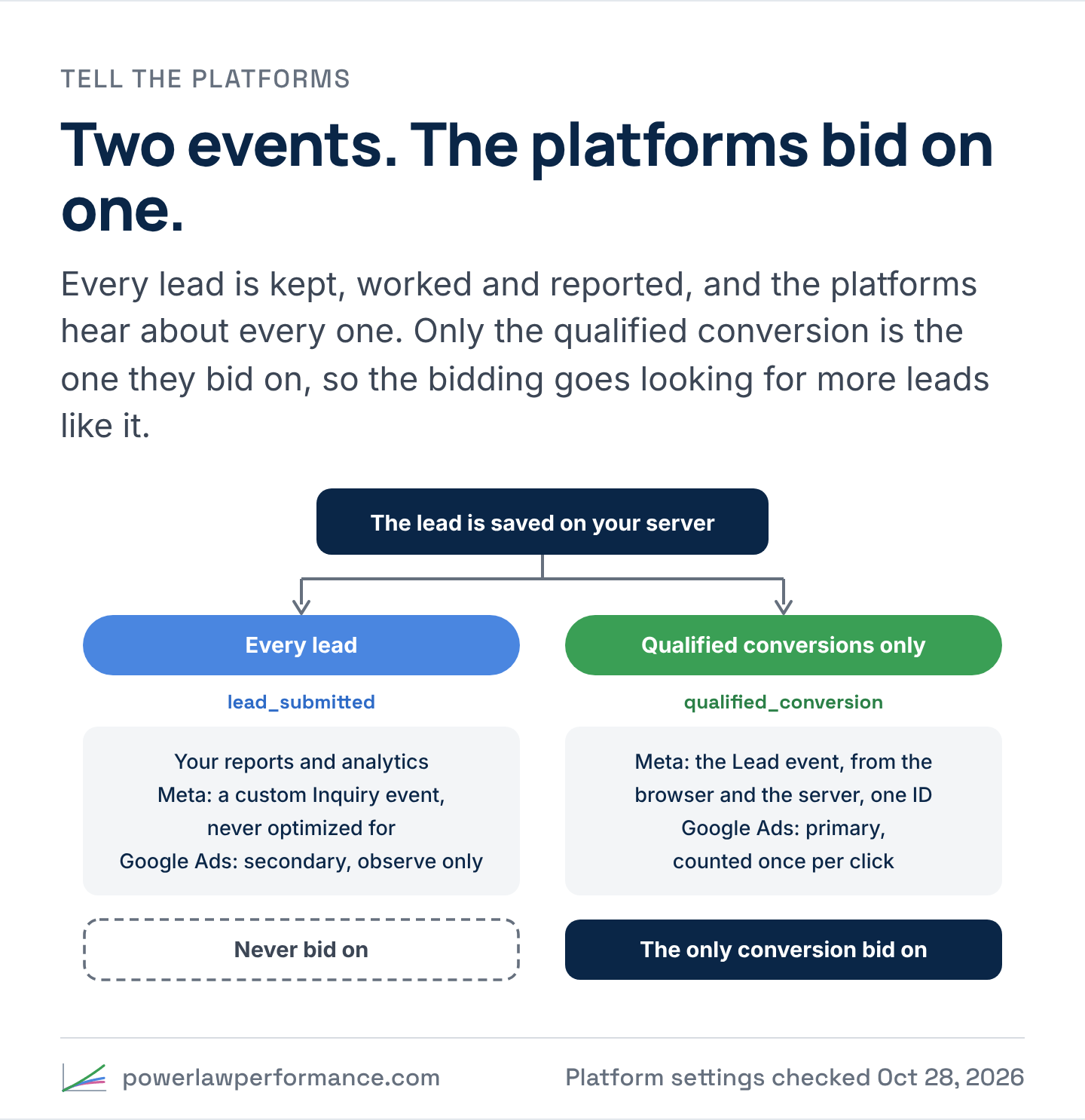
On Meta, the standard Lead event fires on qualified_conversion only, with its event ID set to the lead ID, and the ad sets optimize for it. A server-side copy of the same event goes through the Conversions API, with the same event name and event ID, hashed email and phone, the visitor’s IP and browser, and Meta’s own browser cookies. Meta counts the pair once, as long as the two arrive within 48 hours of each other. Every lead, qualified or not, also goes to Meta as a custom event named Inquiry, so Meta’s own reports count every lead beside the qualified ones and the two counts can be tied out. It’s sent as a custom event, not a standard one such as Lead, and no ad set optimizes for it. The Conversions API carries only the qualified conversion, never every lead.
On Google Ads, set the qualified conversion as a Primary conversion action in the goal the campaigns bid toward, and every other lead as Secondary, which Google reports and never bids on. Count both as One per click, because a lead action set to Every counts a repeat submission twice, and the bidding learns from the duplicate. Set the conversion tag’s transaction ID to the lead ID, so a reload can’t count the same lead again, and turn on enhanced conversions so the tag sends the lead’s email and phone, which Google hashes before they leave the browser.
Two setups to avoid on Google. Don’t keep an imported analytics “form submit” as a primary conversion beside the qualified conversion, because the bidding will optimize toward the bigger number. And never fire one conversion action with a value of zero for leads that don’t qualify. Under bidding that counts conversions, a zero-value conversion still counts as one.
Keep the event names, the values and the rules identical everywhere once they’re live. Renaming an event or changing its value changes the signal the campaigns learned on, and puts them back into learning.
Later results go back, only the valuable ones
The best signal is the result itself: how far a lead gets, and what its account turns out to be worth. Those arrive weeks after the click, so for the leads that cleared the line on the form, they go back to the platforms as later conversions, matched to the click by the IDs and the hashed details captured on the form. Send each one as it’s reached, not in a monthly batch: Meta’s Conversions API turns away an event more than 7 days after it happened.
Send them back with care. Meta’s guidance for its CRM integration is to send every stage as it’s reached, the raw lead included, and let the bidding put more and more weight on closed won. The blueprint holds back on purpose, because closed won isn’t the goal. Left to itself, with volume bias pulling the other way, the bidding optimizes for the small closed-won accounts, because there will always be more of them. So the platforms hear about the later stages only for the leads that cleared the line when they came in, as far into the funnel as each one gets, whether or not it goes on to the next stage. A lead that didn’t qualify on the form sends nothing later, even when it advances. The deepest result is the value line, read early enough to land inside the platforms’ windows. Google takes a click ID up to 90 days old and hashed details up to 63 days after the click, so a line read on a full first quarter arrives too late to teach the bidding anything. The first full month of revenue above the median lands in time. Tiering and reporting keep the full quarter. Never every closed won.
- Google: enhanced conversions for leads matches a later result to the click from the hashed email captured on the form, alongside the click ID. From June 15, 2026, those uploads go through Google’s Data Manager API, so check the current method before building it. A CRM import works the same way: each stage’s first timestamp is set the moment a qualified lead reaches it, and the import picks up every qualified record where it’s set.
- Meta: send each later stage, and the value-line result, through the Conversions API with the same hashed details and the lead’s event ID, each in its own event, for the qualified leads only. The blueprint sets out what that send needs. It doesn’t include the sender.
- Which one to bid on: the one that happens soon enough, and often enough, for the bidding to learn from. Keep the later stages as secondary conversions, sent only for the qualified leads, then move the bidding goal later in the funnel as the volume allows. The stage timestamps make that switch a setting, not a rebuild.
Show the platforms who your best customers are
It’s tempting to point existing customers at the qualified thank-you page, through a survey email or a newsletter, so the platforms see more of the people you already know are worth having. Don’t. Every visit fires a conversion that didn’t happen. The platform’s lead count and value rise, the cost per lead looks better than it is, an ad a customer happened to see gets credit for a lead that doesn’t exist, and the bidding learns from people you’ve already won, so some of the spend goes to showing them ads again. With the conversion fired on the server’s answer, a visit with no saved lead fires nothing anyway.
Three ways give the platforms the same picture without inventing a conversion:
- Send back the qualified leads’ later stages and value-line result. The later conversions above tell the platform how far its qualified leads got and which turned out valuable, matched to the click that brought them in.
- Give customer visits their own event. A survey page or a customer area fires a custom event of its own, such as
customer_survey_completed, never the Lead. The platform still matches those people, you can build an audience from them, and the event the bidding learns from stays clean. - Upload the customer list and the leads you already have. Use it to keep existing customers and every existing lead out of prospecting campaigns, whatever each lead answered, and, outside the Special Ad Categories, the customers as a seed for the platform’s audience suggestions. Never upload only the leads below the line. A list of the people who didn’t qualify tells the platform the answer, and the answer never leaves your systems.
In a Special Ad Category, lookalike audiences are gone for a reason: a model built on existing customers can reproduce traits the law protects. Seeding the bidding with your customers is the same model by another route, so it’s a question for counsel before it’s a tactic.
Why the setup changed
None of this arrived in its final form. The first versions of this setup worked, and several of their shortcuts are now out, because the platforms tightened their rules or because the shortcut broke something quietly. If your current setup does any of these, it’s worth changing:
| What earlier setups did | What it cost | What replaced it |
|---|---|---|
Passed the answers in the thank-you page’s address (?rev=50000&biz=3yr) so the tag manager could read them | Every tag on the page reads the address, so the answers went to every platform, analytics tool and widget on every load | The server scores the answers. The address carries nothing |
Passed the code instead (/thank-you/?code=1100), with a custom conversion on “address contains code=11” | The same leak, smaller. A custom conversion built on an answer reads like a targeting instruction, and Meta now flags ones that suggest financial status | Events after the save |
| Fired the qualified conversion on the qualified thank-you page’s address | On financial-services pixels, Meta’s Core Setup can strip everything after the domain, so a rule on the address can miss every conversion on Meta’s side | The Lead event, fired on the server’s answer. The two thank-you pages stay, with neutral addresses, for the visitor |
| Asked for a personal credit band as one of the qualifying answers | Personal financial status, which the platforms don’t allow as a signal | Questions about the business only |
| Fired one conversion with a value for qualified conversions and $0 for the rest | Under bidding that counts conversions, a zero-value conversion still counts, so the bidding learned from every lead | A primary action for the qualified conversion, a secondary one for the rest |
| Wrote the qualifying rule into the landing page’s own script | Every new page copied it, and the copies drifted | One rules file, read by the server |
| Carried the qualification, or the visitor’s details, from step one to step two in a cookie or the address | Lost on some browsers, and personal details ended up in logs | The lead ID only. The server holds the rest |
| Counted every load of the thank-you page | Reloads and back buttons counted twice | Once per event ID |
The direction is the same every time. Less leaves your systems, the decision is made in one place, and the conversion the platforms bid on carries one plain fact: a qualified conversion happened.