ResourcesImplementing Signals and Attribution for Power Law Businesses
One ID and the funnel
One ID that follows every lead through every system, the counts that tie the systems out, and the funnel's stages with a first and last timestamp on each.
Chapter 2 of 7 · 14 min read · A guide by Broad Eye Solutions · Version 1.0 · Updated November 3, 2026
Chapter 2 of 7All chapters
- 1 Where the thread breaks
- 2 One ID and the funnel
- 3 Capture every lead
- 4 Reports run on PRO, never on raw data
- 5 One question that sorts
- 6 Tell the platforms
- 7 Close the loop
- Sources
One ID across every system
A lead can only be judged by what it became if its record in each system, from the ad platform to the revenue, can be tied to the next. Break one link and the revenue can’t be traced back to the ad, the form or the answer that brought it in.
The systems don’t share an ID, and they won’t. Each one keeps its own. The goal is one distinct ID for every lead, an ID that can be tracked across every system, with each system’s own IDs tied to it. This guide calls it the lead ID.
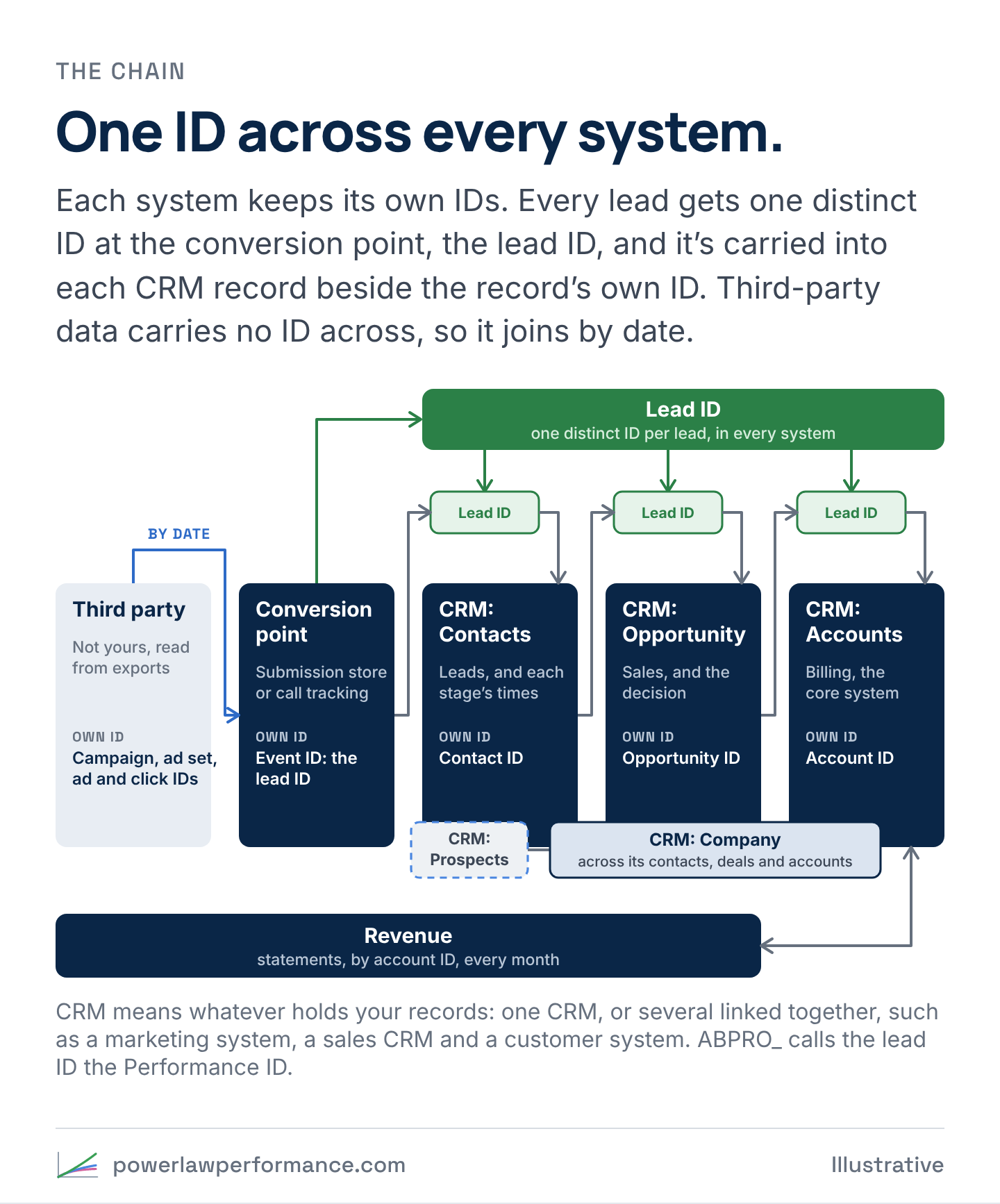
The chain runs through these systems, each with IDs of its own:
- Third party is where the data starts: systems that aren’t yours, wherever they keep it. The ad platform keeps its own count of the impressions, the clicks, the spend and, later, the conversions it logged, by campaign, ad set and ad, and you read it from its exports. Each click gets a click ID (
gclidon Google,fbclidon Meta), and the tracking tags carry the campaign, ad set and ad IDs onto the visit. Product analytics, such as PostHog or GA4, records the visit under a session ID of its own, with the tags and the page the visitor landed on. None of it carries an ID into your systems, so it joins the rest by date. - The conversion point is the door, and every contact needs one: a web form, a chat, a call, a partner’s referral, a list, a feed from a third party. A web form’s submission is saved in a submission store under its event ID, which becomes the lead ID, and a call is logged by call tracking under a call ID.
- CRM: Contacts holds the people. A contact is a prospect until it raises its hand, and a lead from then on. Each contact has a record ID of its own, and the lead ID is saved beside it.
- CRM: Opportunity is sales’ record, with its own ID, opened when the rep converts the lead. Where there’s underwriting or approval, the decision and its reason are recorded on it.
- CRM: Accounts holds the customers, the account in billing or the core system, under its own account ID.
- CRM: Company keeps the business together: one company, across its contacts, its opportunities and its accounts.
- Revenue arrives every month on statements and invoices, by account ID.
CRM here means whatever holds your records. It can be one system, such as HubSpot on its own, or several linked together, such as Pardot for marketing, Salesforce for sales and a third system for customers. The chain works the same across any of them, because it rests on the IDs each system keeps, not on one vendor’s objects.
What the ID is matters less than that it’s made once, where the record enters, and never changes. In the blueprint, the lead ID is the event ID of the submission that created the lead, made on the page the moment the form is sent. A record from a call, a partner or an import gets an ID made the same way every time, such as a stable hash of its email and date, so it never changes when the data is rebuilt, and a prospect keeps its ID when it becomes a lead. An ID map keeps one row per lead ID, each system’s own ID beside it, and how each match was made.
ABPRO_ calls the lead ID the Performance ID, and keeps the ID map that ties every system’s own IDs to it for each client.
A few rules keep the chain from breaking:
- Carry the lead ID into every system that will take it. Save it on the CRM record, send it with the application to underwriting, and write it on the account where billing has a field for it. Each system that holds it is one fewer join to make. Where a system won’t take it, match the records on the IDs they do share, or on the email and date, and keep the match in the ID map. A link nobody records leaves the revenue orphaned.
- Keep the lead and the opportunity separate. The contact’s funnel runs from the prospect to the SQL, and answers the questions before the commitment: did they raise a hand, meet the criteria, get reached and get qualified. At the SQL the rep converts the lead to an opportunity, and the opportunity answers sales’ questions from there through to funded or lost. One object holding both works at low volume, then gets in the way of forecasting, win and loss analysis and repeat business.
- A prospect isn’t a lead. A name that hasn’t shown interest yet, or a conversion your systems hold before it’s accepted as a lead, is a prospect. It becomes a lead on a hand raise: a form sent, a call made, a reply, a meeting booked, a request to be contacted. Keep them apart, so a lead count and a lead source each mean one thing.
- One email can have many leads. A new inquiry is a new lead, with its own record and ID, and a repeat of the same submission is a duplicate. Joining on email alone can match an account to the wrong submission, and to the wrong source.
- Tie every contact, opportunity and account to its company. A business can send in several people, and win, lose and come back. The company record keeps them on one line, so revenue is counted once per business, and a second contact isn’t mistaken for a new customer.
- Give every stage its own timestamps, the first and the last time a record reached it. The funnel section below sets out the stages.
The date joins what IDs can’t
The ad platform never sees a lead’s ID, and the CRM never sees a click’s. Their records can’t be joined one to one, and they don’t need to be. Count each system’s records by date, and by source and campaign where it has them, and lay the counts side by side.
Every system keeps its own count
Each system counts the same people at its own step. The platform counts clicks and the conversions it logged. Analytics counts visits. The submission store counts web submissions, call tracking counts calls, and the CRM counts leads. No two of those counts match. But each pair keeps a steady ratio, week after week, and a ratio that moves means something broke between the two systems. Count every week the same way, Saturday to Friday.
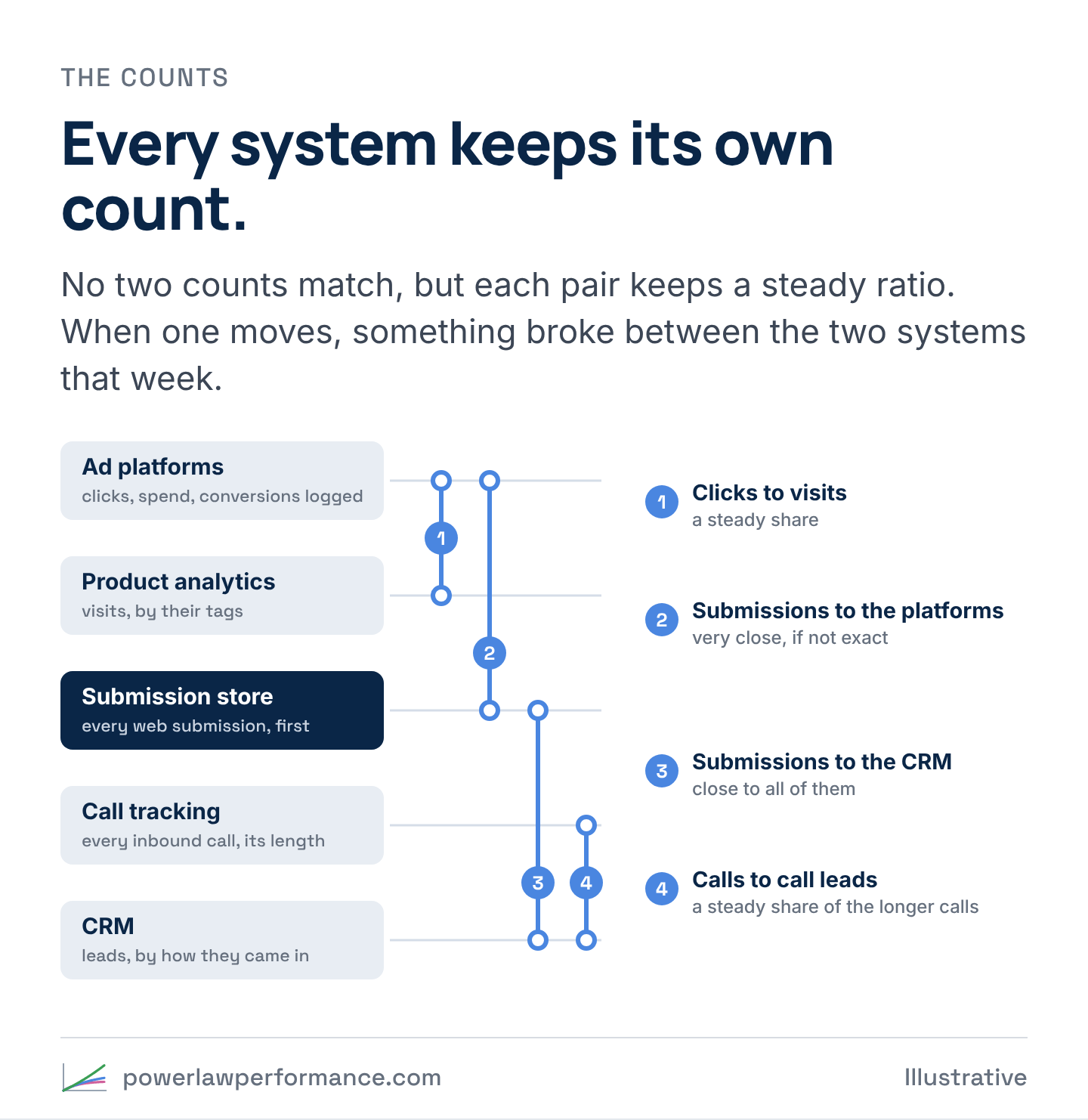
That’s why every web submission goes to a submission store as well as the CRM: a Google Sheet, or a web-connected database or form system. The store keeps each submission exactly as it arrived, and the CRM gets the lead on one path. When the connection to the CRM fails, no lead is lost, and the gap shows up in the next week’s numbers instead of the next quarter’s revenue.
Four ratios cover the chain:
| Tie-out | What to expect | What a gap points to |
|---|---|---|
| A platform’s clicks to the visits analytics counted with its tags | A steady share, a little under all of them | The landing page is down or slow, or a redirect strips the tags |
| The qualified submissions a platform should have logged to the conversions it logged (on Meta, the Lead events in Events Manager, not Ads Manager’s results) | Very close to all of them, if not exactly | The tag or the Conversions API stopped sending |
| The web submissions in the store to the web leads in the CRM | Close to all of them, short only by the CRM’s duplicate and spam rules | The connection failed, or a rule is catching real leads |
| Inbound calls over a set length to the leads sales created from calls | A steady share | Calls answered and never logged as leads |
Google should have logged the qualified submissions whose source is Google, from visitors who didn’t opt out of tracking. Meta gets every source’s qualified conversion, so it should have logged all of them from visitors who didn’t opt out. The store-to-CRM ratio is also the first step of the web track’s funnel, from conversion to lead. Each ratio reads the counts above, week by week. The blueprint lists all four, with what a gap usually means for each. Run them every week and mark the week a ratio moves.
When the chain holds, the question from the meeting has an answer. Look up the account, find its lead ID in the ID map, and the ad, the form, the answer, the rep and the revenue are all one join away.
The funnel, stage by stage
The chain says where each record lives. The funnel says how far each record got. Every record is placed on the same named stages, from the one it entered at to the revenue its account produces, and every report, test and target should call them by the same names.
| Stage | What it means | Who or what moves the record there |
|---|---|---|
| Conversion | An online conversion: a form or chat sent on your site, with its event ID, saved in the submission store | The server that saves the form |
| Prospect | A record in your systems that hasn’t raised its hand yet. Where the systems hold conversions as prospects first, every conversion passes through it. Names that never converted enter here too: a bought list, a trade show’s scans, contacts sent in through an API, names the team has cultivated | The import, the API, the marketing system or the CRM |
| Lead | Someone who has raised a hand, on any track: an online conversion, an inbound call, a referral, a prospect who replied or booked a call. One record and the lead ID. A duplicate or a test is a conversion, never a new lead | The server that saves the form for web leads, the CRM for every other track |
| MQL, interest signaled | The subset of leads that meet the organization’s qualifying criteria, whatever track they came in on | The qualifying rules, applied to what the lead told you, on a form or on a call |
| SAL, interest confirmed | Sales reached the lead, and the conversation confirmed the interest. Sales accepts it as worth working | The rep, from a logged conversation |
| SQL, sales qualified | The rep has qualified it against what the offer needs, the size, the need and the timing, and converts the lead to an opportunity. The contact’s funnel ends here | The rep, by converting the lead |
| SQO, sales qualified opportunity | The opportunity reaches a real commitment, such as a signed application or an accepted proposal | Sales, when the commitment arrives |
| RQO, risk qualified opportunity | Underwriting or the risk review approved it. Only businesses with an underwriting process have this stage | Underwriting |
| Closed won | Signed, funded, or the first payment received | Sales operations or finance |
| Activation | The account is live: the first transaction, the first invoice | The core system |
| Revenue | Each month the account bills, by account ID | Billing |
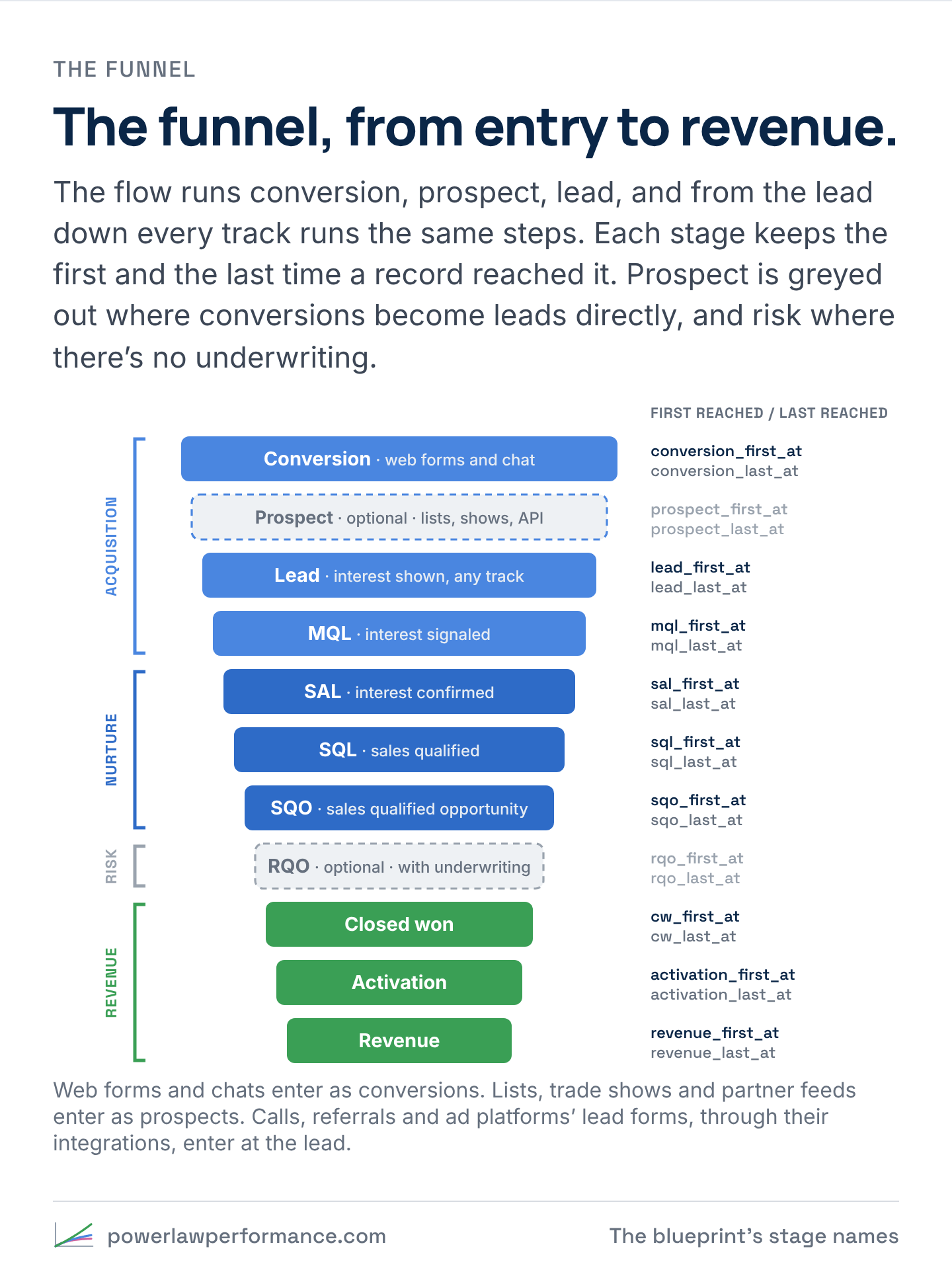
The flow runs conversion, prospect, lead. Every record enters the funnel at a named stage, depending on the track it came in on. A form or chat on the website enters as a conversion. A bought list, a trade show’s scans and contacts sent in through an API enter as prospects. An inbound call, a referral or an ad platform’s lead form, which the person filled in to be contacted, enters as a lead. Keep the stage each record entered at on the record, beside its capture method. Then every track is measured on the same steps: a web campaign from conversion to lead, through prospect where the systems have that step, a list from prospect to lead, and every track from the lead onward. Below the lead the rates are standardized, so a trade show, a bought list and an ad campaign are compared on the same funnel.
The stages fall into four parts of the business. Acquisition runs from the conversion, through the prospect and the lead, to the MQL, nurture from the SAL to the SQO, risk is the RQO, and revenue starts at closed won. Two of the stages belong to some businesses and not others. Many systems turn a conversion straight into a lead, and that’s fine: the prospect stage is greyed out for those records. The risk section belongs to business models with underwriting. Where there’s no underwriting process, it’s greyed out too, and a lead goes from the SQO straight to closed won. Most of the conversion rates on a dashboard are one step between two of these stages, reported as if each were the whole funnel.
The qualified conversion isn’t on this list, because it isn’t a stage. It’s an advertising signal, the subset of conversions whose answers clear a line, sent to the ad platforms as the one conversion they bid on. Firing it for fewer than all the conversions points the bidding at more value in the conversion pool instead of more conversions, and it never enters the funnel. The MQL is the organization’s own bar, and a lead reaches it from any track. It often takes in every lead that cleared the qualified conversion’s line, plus other leads that meet a higher standard the organization sets. An inbound phone call is never an online conversion, but it’s a lead, and it can be an MQL. So the qualified conversions and the MQLs are different counts, and the MQLs include leads the platforms never saw.
Write down what moves a record into each stage, and use the same names in the CRM, the reports and the meetings. If marketing and sales define a stage differently, they count different leads under one name, and neither team’s rate for that stage can be checked against the other’s.
Inside the lead: assign, engage, advance
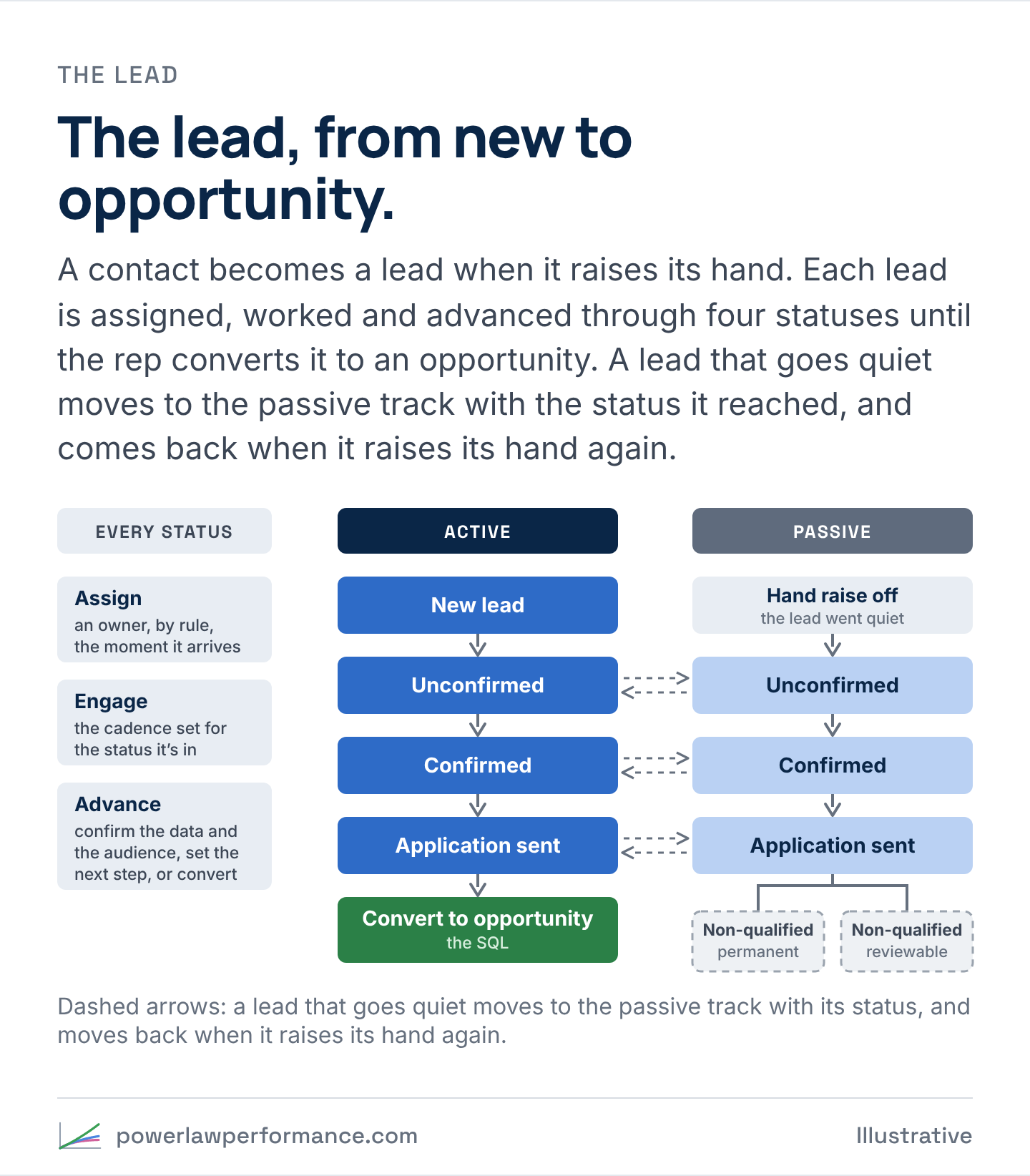
From the prospect to the SQL, the record lives on the contact, and a status says where it is. The SAL and the SQL are reached by working the lead, so the statuses describe that work.
A contact becomes a lead on a hand raise: it sent a form, called, replied, booked a meeting or asked to be contacted. Until then it’s a prospect, and nobody works it as a lead. Every lead then gets the same three moves, whatever status it’s in:
- Assign. An owner, by rule, the moment it arrives, so no lead waits for someone to notice it.
- Engage. The cadence set for its status. The calls, emails and texts for a new lead aren’t the ones for a lead that’s already confirmed, so each status has a cadence of its own.
- Advance. One of three things moves it on. Confirm the data (the contact details are real) and the audience (the business is one the offer is for). Set the next step: a follow-up booked, or the application sent. Or convert it.
| Status | What it means | The stage it marks |
|---|---|---|
| New lead | Assigned, not reached yet | Lead, and MQL where it meets the criteria |
| Unconfirmed | Being worked, the data and the audience not confirmed yet | Lead |
| Confirmed | The rep confirmed the data and the audience: a real business the offer is for | SAL, interest confirmed |
| Application sent | The next step is out: the application, the proposal or the demo | SAL, on the way to the SQL |
| Converted | The rep converted the lead to an opportunity | SQL |
Every status has an active and a passive version. A lead that stops answering has its hand raise set to off, and moves to the passive track with the status it reached: an unconfirmed lead stays unconfirmed, and a lead with an application out stays application sent. Passive leads get a lighter cadence, mostly email, instead of a rep’s calls. A new hand raise moves the lead back to the active track at the same status, so nothing it earned is lost.
A passive lead ends one of two ways. It’s still qualified, and worth the nurture, or it’s non-qualified, with a reason from a fixed list. Non-qualified is either permanent, such as a business that closed or was never a fit, or reviewable, such as one that’s too small today, and a reviewable lead is checked again on a schedule.
If your CRM calls these statuses something else, such as attempting or connected, map its statuses to these the same way the source values are mapped, and keep the CRM’s own names as they are. The status says where a lead is now. The stage timestamps below say when it got there.
Two timestamps for every stage
A status field says where a record is now, and it’s overwritten every time the record moves. So every stage also gets two timestamps of its own.
- First reached is set the first time the record gets to the stage, and it never changes. Funnel reports count it, cohorts are built on it, and the time a record took to reach each stage is measured from it.
- Last reached is updated every time the record gets to the stage again. The gap between the two shows a lead that went quiet and came back, an application resubmitted after a decline, or an account that returned.
Take one lead from an inbound call, with illustrative dates.
| Stage | First reached | Last reached |
|---|---|---|
| Lead | Jan 6 | Jan 6 |
| MQL | Jan 6 | Jan 6 |
| SAL | Jan 6 | Apr 14 |
| SQL | Apr 14 | Apr 14 |
| SQO | Apr 21 | Apr 21 |
The status says SQO. The first timestamps alone say the lead took three months to qualify. Both together say what happened: the rep confirmed the interest on the first call, the lead went quiet, and sales picked it up again in April and qualified it the same day.
A few rules keep the timestamps honest:
- The system sets them from the event that moved the record wherever it can: the server that saves the form for online conversions and the leads they create, the integration for an ad platform’s lead form, the import, the API or the marketing system for prospects, the CRM for leads from every other track, the qualifying rules for the MQL, the phone system’s logged conversation for the SAL, the opportunity for the SQO, the decision record for the RQO, the funding or payment for closed won.
- A first timestamp is never edited. A correction is kept in a separate overrides table and applied on top every time the data is rebuilt.
- A stage the record never passed through stays blank. A web lead whose systems skip the prospect step has no prospect timestamp, and a lead from an inbound call has no conversion timestamp. The funnel report reads every track from the lead onward, and counts a record at every stage up to the furthest one it reached, so a skipped step doesn’t drop it.
- A lost lead keeps what it earned. It gets a lost timestamp and a reason from a fixed list, and every stage it reached stays on the record.